
Data Transport
Once data has been logged using one of Canary's Collectors, it is handed off to the Store & Forward (SaF) service where it is sent to its destination, whether it be a local or remote Historian. Both a Collector and the Historian are always paired with a local SaF service for the sending and receiving of data (Fig. 1).
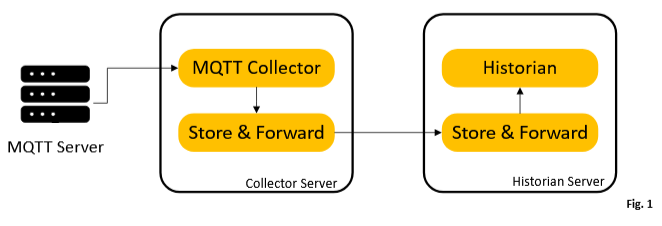
In the event of network interruptions or the Historian service being down, the SaF service will buffer data to disk until the connection is reestablished, at which point, data is flushed in chronological order.
Opening the SaF tile, you should see a data stream for each configured session we created in the last module: Hays, Travis, Comal, and Guadalupe.
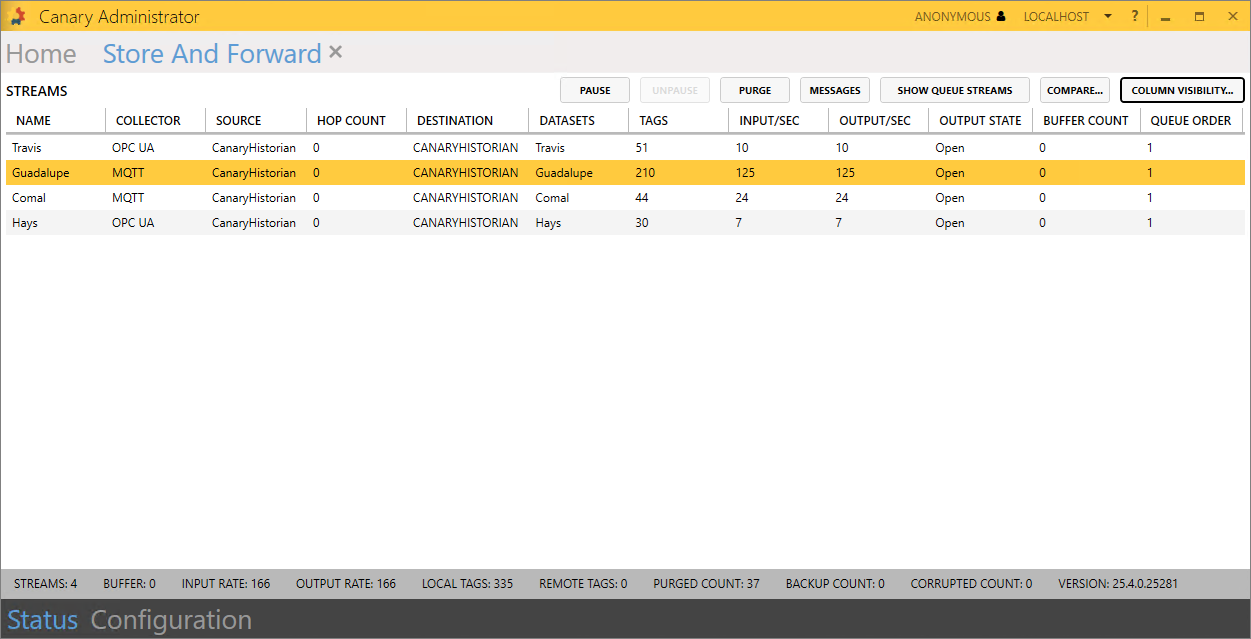
Each stream displays the COLLECTOR it is using, the SOURCE machine name where it is coming from, the DESTINATION machine name where it is going, the DATASET in the Historian will it be stored, the number of TAGS, and I/O metrics.
If a stream cannot forward data onto its destination, the BUFFER COUNT will increase.
Selecting a session allows you to PAUSE/UNPAUSE the stream (data will buffer while it is paused), PURGE the data (this incurs data loss), and open and filter the MESSAGES tile with messages that pertain to that particular data stream.
 Print this page