
Project Overview
Purpose
The purpose of this project is to provide new users a hands-on experience of installing, licensing, and configuring Canary's software.
Prerequisites
- Canary Installer
- Demo license
- Windows Server 2019/Windows 10 (1803) or later OS
Contact your Canary representative if you need the latest install and/or a demo license.
Description
Users will go through the steps of installing, licensing, and configuring the Canary system. This will include general information on user authentication (Identity), logging data using the OPC UA and MQTT Collectors, data transport (Store & Forward), data storage (Historian), building a Virtual View or asset model (Views), creating calculations and events (Calc & Events), building Axiom applications, and data egress (Publisher and web API).
In a typical production deployment, Canary services are installed across multiple servers to collect data from various sources and route it to one or more Historian machines (Fig. 1).
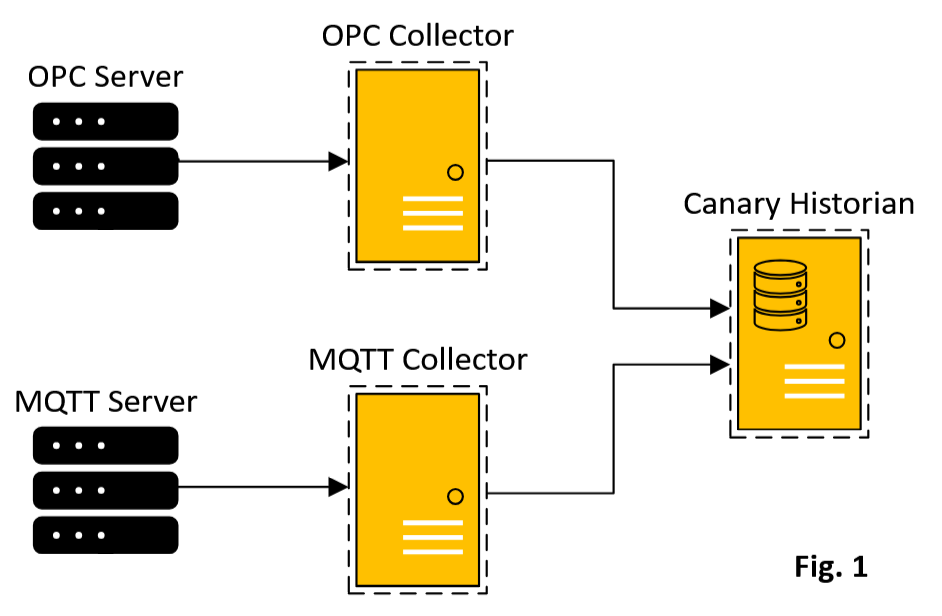
For this project, all Canary services will be installed on a single server.
 Print this page