
Read API
Canary offers a native gRPC API and a web API for both reading and writing data. This module focuses solely on the web Read API. To test, we suggest downloading Postman and following the instructions from the article, Web Read API - Postman Example. The postman_collection.json and postman_environment.json files attached at the top of the article target the {Diagnostics} DataSet from a local Historian.
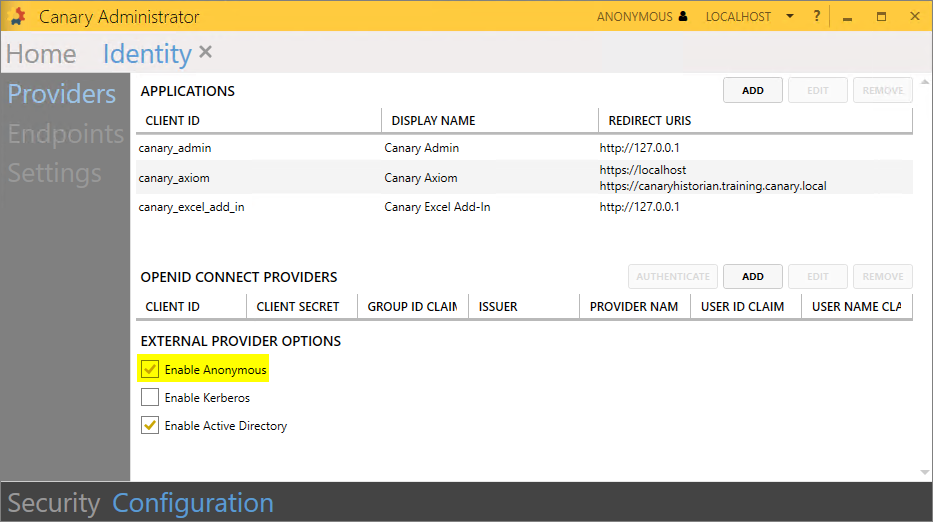
If not wishing to install Postman, the following examples can be pasted into your browser. These require the Anonymous provider be enabled from the Identity tile>Configuration screen as an "apiToken" is not specified within the URL.
/browseTags
Returns tags found under the "Water District.Canary Water" path.
https://localhost:55236/api/v2/browseTags?path=Water%20District.CanaryWater&deep=true
Returns all tags found in the {Diagnostics} DataSet.
https://localhost:55236/api/v2/browseTags?path=localhost.{Diagnostics}&deep=true
/getTagProperties
Provides a list of all available properties associated with [Hays.Station01.Pump01.Flow].
/getTagData
Returns last value of specific tags.
Returns last value of tags within the {Diagnostics} DataSet that contain the string "Sys".
https://localhost:55236/api/v2/getTagData?path=localhost.{Diagnostics}&deep=true&search=Sys
Returns raw data values of included tag for past 5 minutes.
Returns 5m aggregated data (TimeAverage2) for the past entire hour for all tags that fall under the "Water District.CanaryWater.Travis.Station01" path.
 Print this page