
0
Receiver to SaF Transmission
Knowledge Base / Version 26 / System Admin Duties / Data Collection
Starting in v26.2, the Receiver service has the option of writing data to a local Store & Forward (SaF) service instead of directly to the Historian. In v26.3, this redirect is automatic.
This change in data flow aids in the migration from Receiver to SaF when the Receiver is discontinued in v27. If using pre-v24 Collectors with the Sender service, users must upgrade these Collectors to v26.2+ prior to upgrading the Historian to v27, or set up an interim proxy running v26.2+ through which data will pass before reaching the Historian.
Enabling Receiver to SaF (v26.2)
- Open C:\Program Files\Canary\Receiver\proxy.config. This is the same file that is used to configure a proxy server using Sender/Receiver.
- Set <proxyEnabled> to true.
- Provide the destination(s) using the <historian> parameter. If the Historian is local, use localhost; otherwise, use the remote Historian hostname.
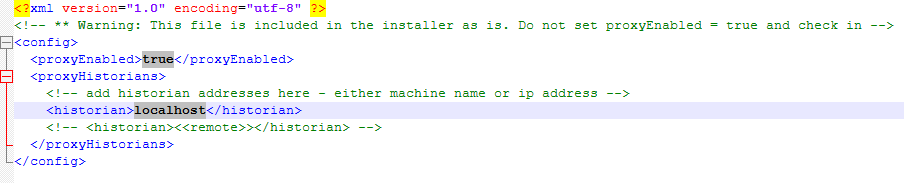
- Save the file and restart the Receiver service.
Receiver to SaF (v26.3)
If the proxy.config file is not configured, data will flow automatically from Receiver to SaF to a local Historian destination. If the proxy is enabled, data will be sent to the provided destinations.
Data Flow
Local Historian

Remote Historian with Proxy

 Print this page