
Changing Canary Server Names (version 26)
Canary uses the server name for some of its processes and how its services communicate with each other. Therein, downtime can occur whenever a server name is changed. Below are items that must be updated whenever a name change occurs.
Historian Server Name Change
Views
The Views service must be updated to find the new local Historian view.
- C:\ProgramData\Canary\Views\views.service.json - update the Endpoint and Name to match the new server name. Restart Views.

Axiom
Wherever the Axiom Core is installed (typically, it is local to the Historian), charts and applications must be updated to use the new Historian name if using the Local Historian view for their SourceTags.
- C:\ProgramData\Canary\Axiom\Files\[subfolders]
We recommend using Notepad++ to do a Find/Replace across an entire directory.

Collectors
Any remote Collector must be updated with the new Historian server name so that data can be logged. Data being sent to the old server name will buffer in the Store and Forward (SaF) service.
Identity and/or License Server Name Change
Typically, the Identity and License services are installed local to the Historian. So if the Historian server name is changed, this will affect any Canary server that must connect to these services.
Identity/License Endpoint
Each Canary server must be updated to use the new Identity and/or License endpoint. Before doing so, any licenses residing on the License service will need returned prior to making changes. Licenses can be returned by clicking the REMOVE LICENSE button next to them.
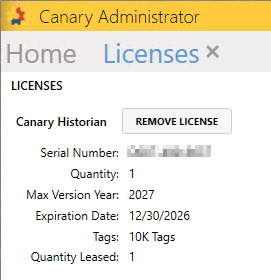
If the server does not have internet access, a return key will be generated which can be used to return the license using Canary's website: https://www.canarylabs.com/support. See more details here for transferring a license.
With the licenses returned, update the following file on all Canary servers using that License/Identity endpoint:
- C:\ProgramData\Canary\Node\node.json - update IdentityClientEndpointAPI, IdentityClientEndpointOIDC, and LicenseClientEndpoint to use the new server name. Restart ALL services after making changes.

Once the file has been updated the licenses can be re-pulled.
Axiom Server Name Change
If the server name hosting the Axiom Core is changed (typically, it is the same server as the Historian), the following files must be updated:
- On the server where the Identity service is hosted, C:\ProgramData\Canary\Identity\identity.service.json - update the Axiom RedirectUri to the new server name

 Print this page