
0
Asset Template Control (version 26)
Knowledge Base / Version 26 / Client Tools / Axiom / Applications
The Asset Template control is only available to use if a Virtual View has been created within the Views service where assets are defined. When dropped onto the screen, the user is prompted to select a virtual view followed by an asset type. A panel containing an asset label is created for each asset instance.
When placing other controls into an asset panel or resizing the panel itself, the behavior is replicated across all instances. If a tag linked to the control does not exist for a particular asset instance, the control will display a dash (-) indicating so.
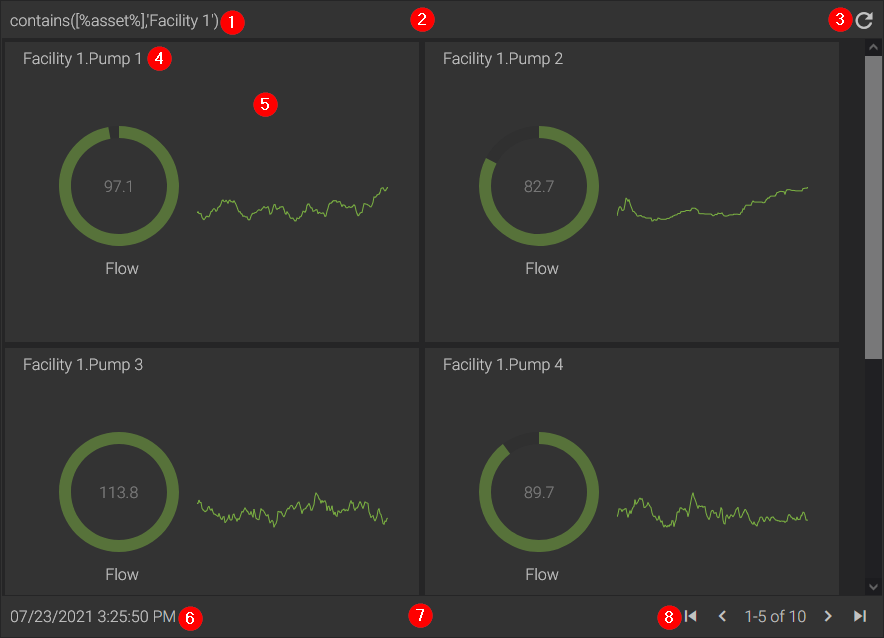
- Template Filter
- Header
- Refresh Button - forces the asset template to refresh if a filter is applied
- Asset Label
- Asset Template Panel
- Datetime of last refresh
- Footer
- Page navigator
Properties
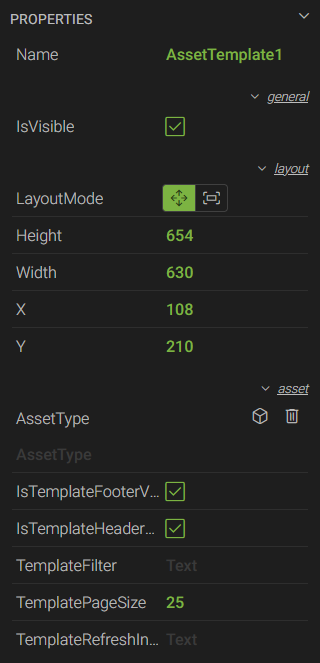 *Name - a unique name used to reference the control in script
- IsVisible - a checkbox to show or hide the control
- LayoutMode - sets the size of the control based on the Height and Width properties (Move), or fills the entire space of its parent container (Fill)
- Height - the height of the control in pixels
- Width - the width of the control in pixels
- X - the horizontal coordinate of the top-left corner in relation to its parent container
- Y - the vertical coordinate of the top-left corner in relation to its parent container
- AssetType - opens the CONFIGURE ASSET TYPE menu to select a Virtual View and an asset type defined in that view
- IsTemplateFooterVisible - a checkbox to show or hide the footer
- IsTemplateHeaderVisible - a checkbox to show or hide the header
- TemplateFilter - an expression or statement used to filter the asset instances shown within the template. For examples of how to apply different filters, see How To Filter Asset Templates and Grids.
- TemplatePageSize - the max number of panels to display within each page of the template. If the number of assets exceeds this amount, a page navigator will appear in the bottom-right corner of the template.
- TemplateRefreshInterval - used in conjunction with the TemplateFilter, the frequency at which the template refreshes using the provided filter
* These properties are only available to Canary users listed on the Axiom>Script access control list within the Identity tile.
 Print this page