
Axiom Trend Display Name Not Modifiable
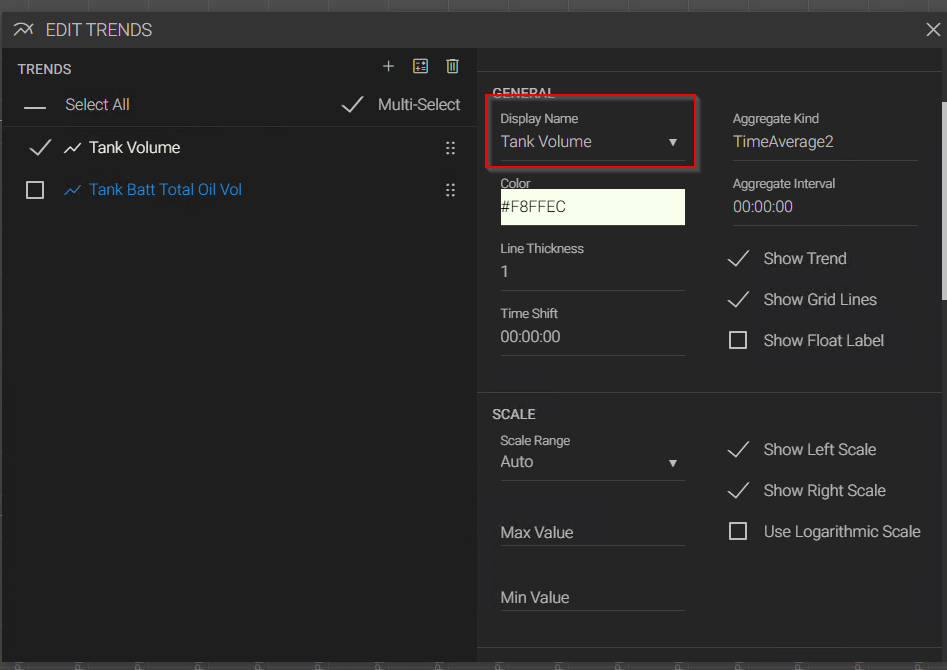
New in V25.5, I can no longer edit the display name of a trend in Axiom. If I try and type anything into the "Display Name" field, it is immediately overwritten with the default settings and reverts back to the defaults. I tried this on two separate Canary 25.5 systems, and both show the same behavior. This is not present in 25.4, which still allows the field to be modified. No errors are reported in the Canary logs.
"Display Name - the name that appears on the chart and in the legend. This can be edited. Tag names must be unique within the chart. If a duplicate tag is added to the chart, a (1) will be appended to it."
-Edit Trends Menu (version 25) - Charts - Canary Community
3 replies
-
Hi ,
I was able to replicate this as well.
-
This same sort of thing is happening while attempting to change scaling from auto to manual and setting the range, will not work unless you pause the trend first.
Content aside
 Print this page
- Status Acknowledged
-
1
Votes
- 13 hrs agoLast active
- 3Replies
- 43Views
-
5
Following