
Event email notification
Hello.
on Message tile, smtp servers are all set and test-email works as expected
When dataset doesn't receive data for x mins or hours, it sends alert email fine.
But when I create an 'event' on Calcs & Events Tile, and enter notify email,
it sometimes works and sometimes doesn't.
Set up a start trigger,
and on Axiom I confirmed that event instances have been made quite a lot,
but only one email has arrived, or sometimes it doesn't send email.
Theoretically,
if there's an event called XXX,
and XXX is triggered 10 times, so 10 instances of XXX are created,
10 emails should be sent. Am I not correct on this?
and can event email be sent to multiple email addresses?
On Message tiles, I entered two emails for example, abc@abc.com,www@www.com
comma as a separator. and it worked
can I use the same syntax with comma for event email?
Thank you!
3 replies
-
Hi
You are correct that for each event instance you should receive a separate email. For example, I have just run an event where the start trigger expression is met every minute – I had 10 events trigger over 10 minutes and received 10 separate emails to multiple email accounts. You are correct that you can have multiple email addresses specified – these should be separated by a semi-colon, however I tested that a comma separation also works.
If you're able to send a test email from your Messages tile within the same Canary Admin that the event is configured from, this would confirm that email messages are enabled and should be delivered for any triggered events where you've specified an email address.
When you mention viewing the events in Axiom, are you looking at the raw data trends to determine that event should have occurred, or are you viewing the actual triggered events using an Events Table control (like the below image)?
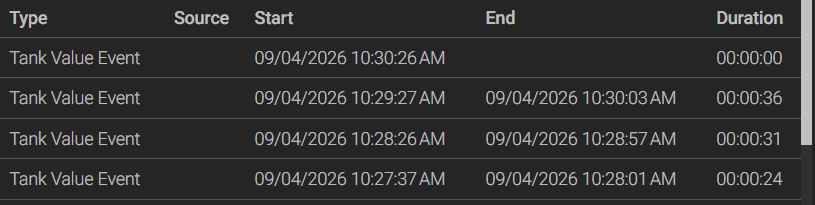
I would also check within the Canary Admin – from the main "Jobs" screen within the Calcs & Events tile, right click on your event and select "Browse Events". This will show you every time the event has triggered, what email address was set to be notified, and at what time that message was sent (not applicable for backfilled events).
If you're not seeing as many events triggered as expected, this could be related to your event start or stop expressions not being met as frequently as you'd expect, or it could be that you have the evaluation Mode set to Periodic (interval based) rather than Subscription (real time).
Could you also please share the Canary version you are using as well?
This help center article will give some in depth details on the function of all configuration elements for events: https://helpcenter.canarylabs.com/t/p8ypf8v/calcs-events-tile-version-26
 Print this page