1

Trend Chart - Scale Range Dropdown Not Working

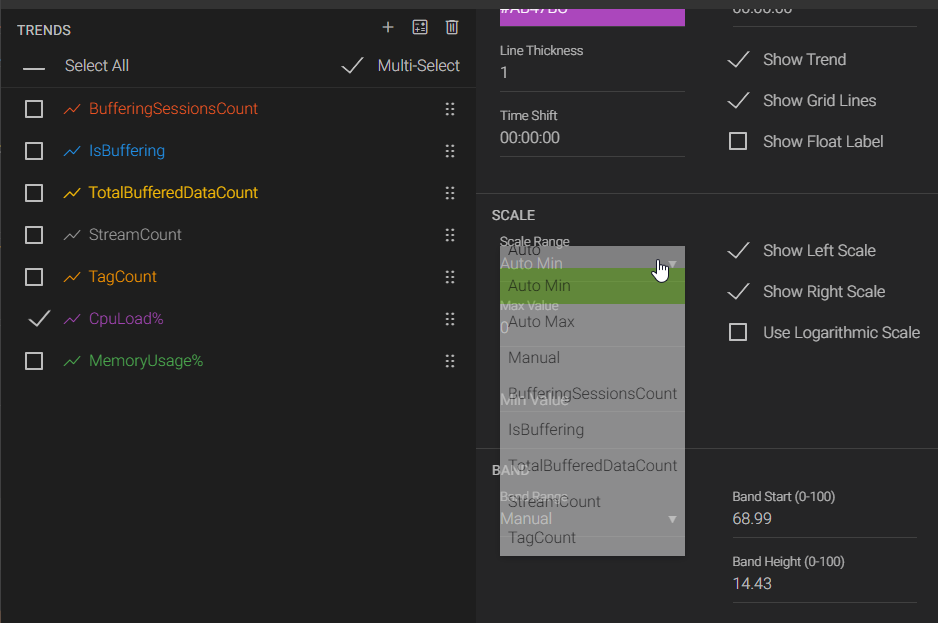
When I right click the scale for a trend chart, and then select the dropdown for Scale Range, the dropdown automatically closes without allowing a selection. I tried this with an existing Application and with a new Trend chart.

6 replies

null
    • smason
    • 1 mth ago
    • Reported - view

    Hi ,

    This stems from the same issue reported here: https://helpcenter.canarylabs.com/t/y4yp8qn/axiom-trend-display-name-not-modifiable.

    If you take the chart out of live mode, you will be able to set the scale.

    • smason
    • 2 wk ago
    • Reported - view

    This was fixed in v26.0.

      • System Engineer | CSE ICON
      • davin_ross
      • yesterday
      • Reported - view

       Hi Steve, I'm still hitting this issue in v26 today. Now, it does not appear to matter if I'm in live mode or not, the drop down disappears as soon as it is opened. 

      • smason
      • 20 hrs ago
      • Reported - view

       Try doing a hard refresh (Ctrl+Shift+R) to see if it still persists. Even after an upgrade, the browser can still have things cached from the previous version. This is something we're actually working on for v26.1.

      • System Engineer | CSE ICON
      • davin_ross
      • 12 hrs ago
      • Reported - view

       That did the trick. Thanks, as always!

      • smason
      • 11 hrs ago
      • Reported - view

       You're welcome! 👍

Content aside

print this pagePrint this page
  • Status Fixed
  • 1 Votes
  • 11 hrs agoLast active
  • 6Replies
  • 39Views
  • 4 Following