
Axiom List Box Script to Show/Hide Trend Graph Trend
Good Day All,
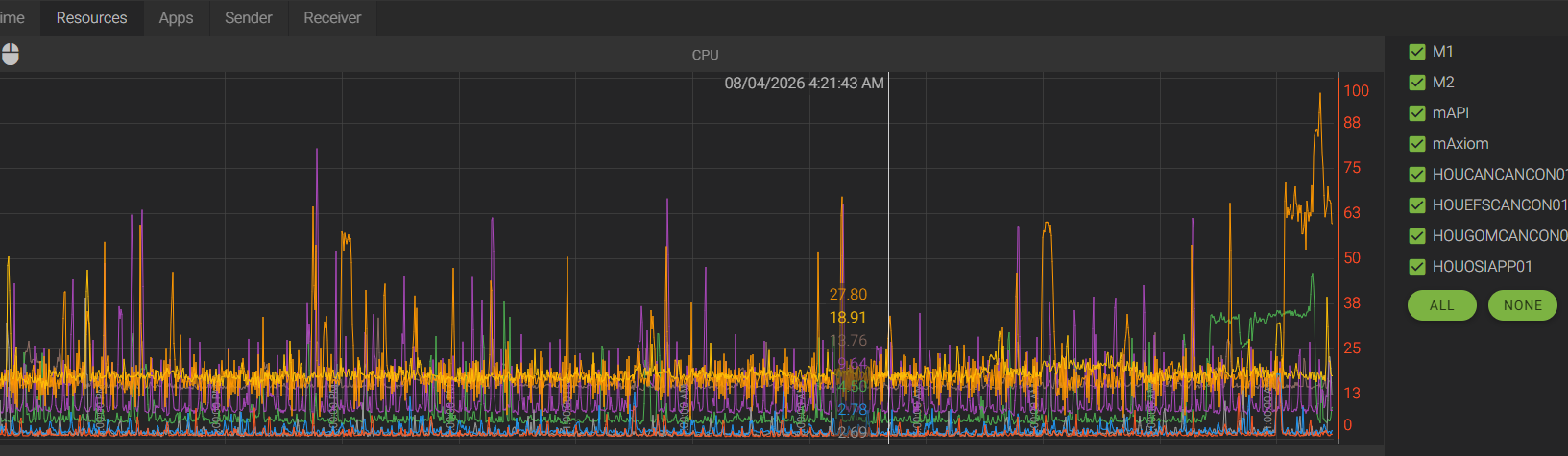
I have an internal customer who would like a list box populated with predefined selections. Based on whether they are selected or not, will determine if they are shown in a trend graph. I have been looking through the scripting documentation and don't see any reference to the "Show Trend" property of the trends in the Trend Graph control. I would have a trend graph already configured for all possible list box selections, and would just show or hide based on the user's selection. Not sure if this is even possible or not.
4 replies
-
Hey , I did the same exact thing! I made sure the items in the List Box have identical names to the Display Names of the Trends. Then, every time a selection changed, I looped through the Trends and toggled IsVisible on the Trend based on if selectedItems.Contains.
public void LB_ServerSelector_OnSelectionChange(object sender, string[] selectedItems) { var controls = Screen.ScreenControls as IReadOnlyControlCollectionWithModifiedEvents<IControlBase>; foreach (ControlBase control in controls) { if (control.Kind == ControlKind.TrendGraph){ var graph = control as ControlTrendGraph; foreach (ControlBase graphChild in graph.Children){ var trend = graphChild as ControlTrend; trend.IsVisible = selectedItems.Contains(trend.DisplayName); } } } } public void B_All_OnClick(object sender, EventArgs eventArgs) { var list = Screen.ScreenControls["LB_ServerSelector"] as ControlListBox; list.SelectedItems = list.Items; } public void B_None_OnClick(object sender, EventArgs eventArgs) { var list = Screen.ScreenControls["LB_ServerSelector"] as ControlListBox; list.SelectedItems = new string[0]; } -
Oh, you do have to be careful with Scales. If you have all the scales together tied to a single trend, and you uncheck that trend, the scale goes away for everyone. Here's a slightly more complicated version. All the trend's scales are still tied to the first trend. But only the first selected trend in the ListBox has IsScaleLeftVisible set to true. If that makes sense.
public void LB_WellSelector(object sender, string[] selectedItems) { bool graphScaleIsVisible = false; ControlTrendGraph trendGraph = Screen.ScreenControls["TG_Wells"] as ControlTrendGraph; foreach (ControlBase graphChild in trendGraph.Children){ var trend = graphChild as ControlTrend; trend.IsVisible = selectedItems.Contains(trend.DisplayName.Replace(".Separator","").Replace("_"," ")); if (!trend.IsVisible) continue; // Make sure only the first selected trend has their scale visible if (!graphScaleIsVisible) { trend.IsScaleLeftVisible = true; graphScaleIsVisible = true; } else { trend.IsScaleLeftVisible = false; } } } public void B_All_OnClick(object sender, EventArgs eventArgs) { var list = Screen.ScreenControls["LB_Wells"] as ControlListBox; list.SelectedItems = list.Items; } public void B_None_OnClick(object sender, EventArgs eventArgs) { var list = Screen.ScreenControls["LB_Wells"] as ControlListBox; list.SelectedItems = new string[0]; } -
Hey There Damon,
Thank you for taking valuable time out of your day to help out. This is exactly what I needed. If I could I would buy you a drink! Have a great day.
Regards,
Tim
 Print this page