
Admin Tile (version 26)

- Remote Enabled - True or False, if the Admin service allows a remote Canary Admin client connection
- Service Version - versioning number of the Admin service
- Client Version - versioning number of the Canary Admin client connecting to the Admin service
Configuration Screen
Endpoints
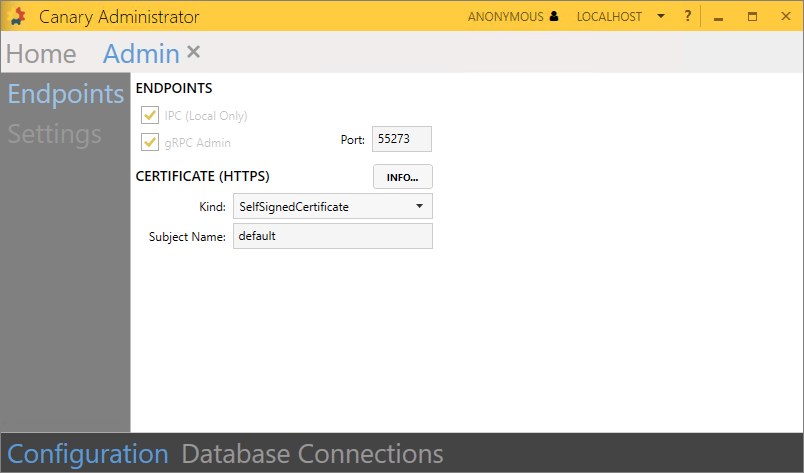
The following endpoints are provided for local and remote Canary Admin access.
IPC (Local Only) - endpoint a local Canary Admin client connects to
gRPC Admin - endpoint a remote Canary Admin client connects to. Users wishing to connect remotely must be placed on the Admin Logon list within the Identity tile>Security>Access Control Lists screen.
If connecting to a local Admin service, the user does not need to be placed on the Admin Logon ACL, but is still required to authenticate.
CERTIFICATE (HTTPS)
- Kind - the kind of certificate the Admin service is configured to use
- SelfSignedCertificate - this is the default certificate that Canary uses. It is stored in the Local Computer\Personal store.
- Certificate - use this option if wishing to upload your own certificate. Doing so will present more options to configure.

- Store Name - local computer store name where the certificate is installed
- Find Type - criteria by which the Admin service searches for the certificate
- FindBySubjectName
- FindByThumbprint
- FindByTemplateName
- Subject Name - set to default if using the SelfSignedCertificate option. Otherwise, the value of the Subject, Thumbprint, or Template name if using the Certificate setting.
Settings
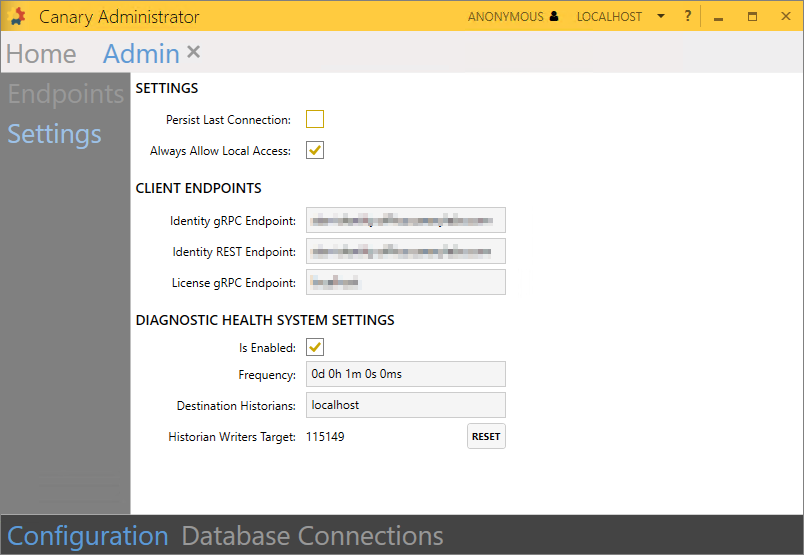
Persist Last Connection - when checked, the Canary Admin client will reconnect to the last Admin service it was connected to. Unchecked, the Canary Admin will default to localhost.
Always Allow Local Access - when checked, allows any valid user to login with the Canary Admin client if they are local to the Admin service regardless of permissions set in the Identity>Security>Access Control Lists>Admin Logon ACL.
CLIENT ENDPOINTS
- Identity gRPC Endpoint - server location of the Identity service that other Canary services, local to the Admin service, connect to if requiring authorization
- Identity REST Endpoint - server location of the Identity service that Canary client tools connect to for authentication
- License gRPC Endpoint - server location of the License service that other Canary services connect to that require a license. In most cases, this should be the local machine.
DIAGNOSTIC HEALTH SYSTEM SETTINGS
Enabled - if checked, additional tags will be logged to the {Diagnostics} DataSet. These tags provide diagnostic information (i.e. memory and CPU usage) for specific Canary services that are installed locally to the Admin service.
Frequency - rate at which the diagnostic tags are logged
Destination Historians - by default, diagnostic tags are configured to log to the local Historian. If no local Historian exists, they can be routed to a remote Historian server by specifying the machine name or IP address. Multiple destinations can be specified by separating server names with a comma.
Historian Writers Target - used to determine the amount of tags the Historian expects to be actively writing. This number is derived from the amount of active writers over the past hour.
RESET - resets the Historian Writers Target
Database Connections (v26.8+)
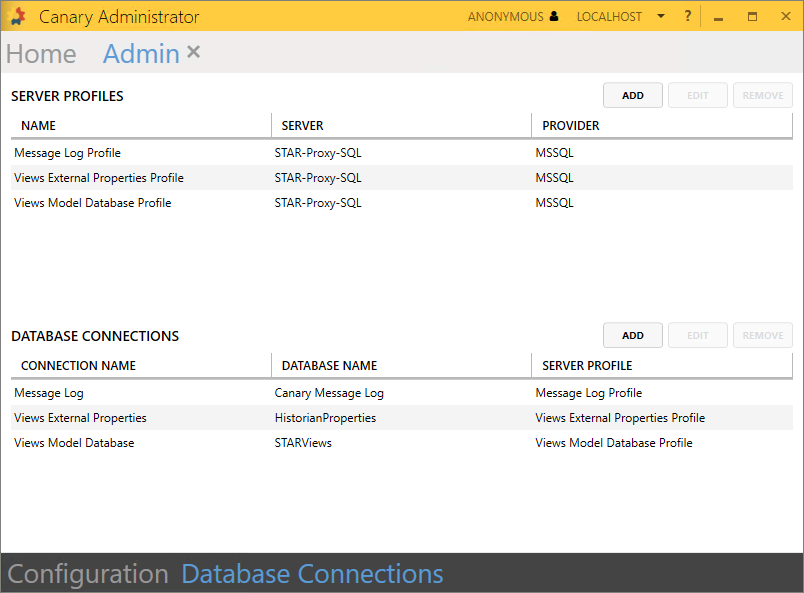
The Database Connections screen is a central location for configuring external SQL server database connections that other Canary services might use in place of a default SQLite file. Prior to v26.8, the configuration for these connections was configured in the corresponding tile respective of the use case. Currently, Canary supports the following use cases for such connections:
- Axiom - store Automated Reports configuration and Axiom Usage analytics. Needed if running Axiom behind a load balancer or redirecting users between a production and backup environment.
- Message Log - store messages from multiple Canary servers
- Identity - needed if using a shared database between multiple Identity services or running multiple Identity services behind a load balancer
- Views (External Properties) - needed if attaching properties to tags that exist outside of the Historian
- Views (Model Database) - allows Virtual Views to be shared amongst multiple Views services
- Events - store Canary events in an external SQL database
SERVER PROFILES
ADD/EDIT/REMOVE server hostnames containing the SQL provider and the credentials of the account used to make the connection.
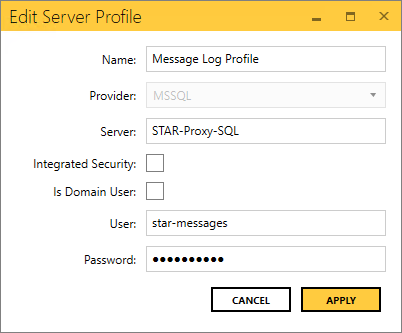
- Name - name of the Server Profile
- Provider - MSSQL, MySQL, or Oracle
- Server - hostname of the SQL provider
- Integrated Security - if checked, the corresponding service will connect to the database using the account on which the service is running
- Is Domain User - determines if the configured user is a domain user
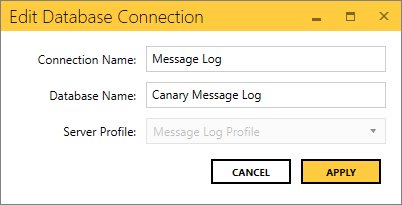
DATABASE CONNECTIONS
ADD/EDIT/REMOVE connection names containing the database within the SQL provider. Multiple connections can be linked to a single server profile.
 Print this page