
Licensing — Dual Historian (Both Historizing) with SaF Proxy Forwarding
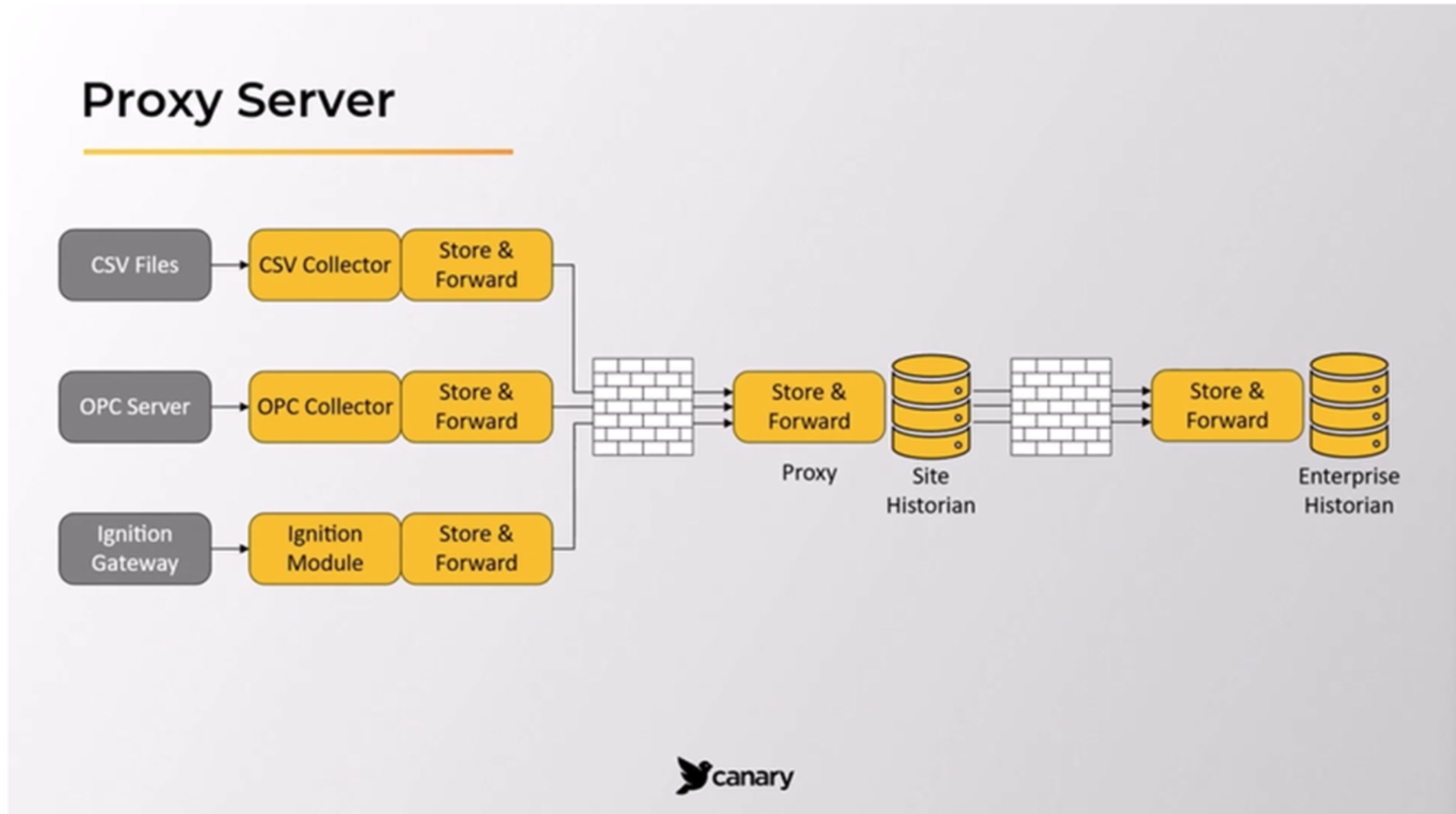
My client wants to add a local Canary instance to their site and I have a question on licensing, license configurations and Historian Configuration.
They were led to believe they do not need any further licensing to the one server they have deployed. I want to confirm this is accurate before I put time in to this. (I know if this was Siemens, or Allen-Bradley, you definitely need a license on each)
Currently they have something similar to the image attached, but they do not have the "Site Historian" in the middle yet.. it's just an ignition gateway Canary Module through an IPSEC tunnel to a Canary instance on an AWS server.
They want to add a local instance. like this image depicts.
What is the recommended license setup? Do they need a license on both Historians? or does their current license support this. If it does, should the license be moved from the AWS instance to the Local instance and the AWS instance points to the local.
What's the Historian/SnF Proxy to the "Enterprise" instance looks like?
I can only find info describing this but not configuring it. any help would be great. If there is a write-up that would really be appreciated.
3 replies
-
What are they using the site historian for? If it’s a data pass through, they can have an SaF relay and just pass data up. Thats included.
But if they want all the benefits of the full historian (historization, axiom, etc.) that’s a 2nd license.
-
Hi ,
is correct. A 2nd historian license is needed for the site if you want to store data there. You're basically paying for a number of tags per historian. It comes with unlimited Axiom and Excel Add-in clients.
When it comes to configuring it, it would be almost identical to the enterprise historian with the exception of the SaF service which would be configured to store data locally at the site and also forward data onto the enterprise level. Here is an article explaining what that configuration looks like: https://helpcenter.canarylabs.com/t/y4ypfxj/how-to-configure-a-proxy-server-version-26 -
Awesome, it's what I was thinking on the licensing. and thank you for the setup link.
 Print this page