
0
Canary Axiom Trend graph default setting adjustment
Feedback / Issues and Bug Report / Bugs or Issues
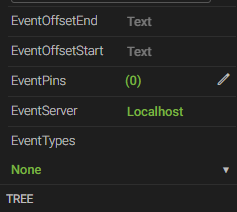
Hello. When I want to make a trend graph, under the properties section,
the EventServer is set to localhost by default.
Is there a way I can change this default setting? (SQL database, or somewhere else?)
so that when I drag trend graph to make a new one, the default setting is set to my customized value.
Thank you.
4 replies
-
Hi ,
EventServer is actually where the Views service resides as it is the Views service which returns those events to Axiom. It is not the database where the events are stored. So you would only want to change it from "localhost" if the Views service were remote from Axiom, which is uncommon.
Content aside
 Print this page
- Status Acknowledged
- 4 mths agoLast active
- 4Replies
- 148Views
-
2
Following