0

Canary Axiom Trend graph default setting adjustment

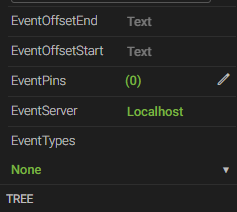
 Hello. When I want to make a trend graph, under the properties section,

the EventServer is set to localhost by default.

Is there a way I can change this default setting? (SQL database, or somewhere else?)
so that when I drag trend graph to make a new one, the default setting is set to my customized value.


Thank you.

4 replies

null
    • smason
    • 2 days ago
    • Reported - view

    Hi  ,

    EventServer is actually where the Views service resides as it is the Views service which returns those events to Axiom. It is not the database where the events are stored. So you would only want to change it from "localhost" if the Views service were remote from Axiom, which is uncommon.

      • tedkdj88
      • 2 days ago
      • Reported - view

       Thank you Steve,

      Yes in my environment, views service and axiom server are separated.

      What I want to know is about this.

      Let's say my Views service is located at "ABC".

      now, after I select trend graph and drag it to the screen,

      by default the event server is set to 'localhost'

      I am wondering if I can do some setting to make sure that

      after I drag a new trend graph to the screen, the event server is automatically set to "ABC".

      or is it that everytime I drag a new trend graph, I need to change it manually to ABC?

      Thanks

      • smason
      • 2 hrs ago
      • Reported - view

       Gotcha. So currently, there is not a way to change the default "localhost", but I will make an internal request to look at this functionality.

      The alternative is to install a Views service local to Axiom, then make a remote connection from Views to the Historian. Here is a video on what that setup looks like: https://youtu.be/km9lU5OqsQ4?si=CD_PyTffqmN5zpbv.

      • tedkdj88
      • 2 hrs ago
      • Reported - view

      Thank you Steve.

Content aside

print this pagePrint this page
  • 2 hrs agoLast active
  • 4Replies
  • 17Views
  • 2 Following