
3
MQTT collector add filtering to exclude long string
Feedback / Product Ideas and Feature Requests / Data Logging
Our historian is connected to a MQTT broker. In that broker we use a UNS type database structure. One of the tags was a long json string. We have been experiencing crashes, which have now been allocated to the use of too long strings.
Would it be possible to filter out tang long strings to make the database more dummy proof and reliable?
5 replies
-
Hi ,
The tag name itself is a long json string, or the values coming in for a tag are long json strings?
If the tag name is a long json string you have 2 options:- If you have Automatically Log All Tags enabled, you can create a filter to include or exclude certain tags using keywords and Regular Expression rules. It's important to note that if you add a filter, it won't apply to any tag that is already logging, it would only apply to new tags as they arrive. Tag settings are "sticky". If you want to apply settings to tags that are already logging, you would need to select the Tags table from the connection group and DELETE ALL tags.
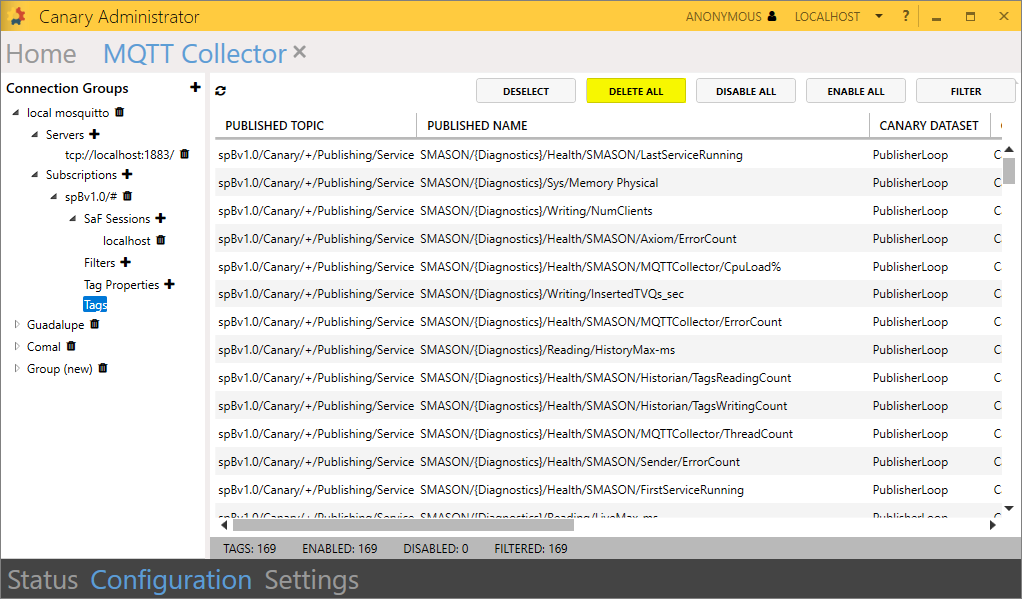
This must be done when the session is disabled. When you go to reenable the session, the Tags table will repopulate and only enable the tags that adhere to the filter. The tag would still exist in the historian, but you could obsolete it manually at that point. - If you disable Automatically Log All Tags, you can manually select which tags from the Tags table you want to enable. Again, the json string tag would still appear in the historical archive even after the update, but you could manually obsolete it.
- If you have Automatically Log All Tags enabled, you can create a filter to include or exclude certain tags using keywords and Regular Expression rules. It's important to note that if you add a filter, it won't apply to any tag that is already logging, it would only apply to new tags as they arrive. Tag settings are "sticky". If you want to apply settings to tags that are already logging, you would need to select the Tags table from the connection group and DELETE ALL tags.
 . Thanks for the feature request!
 Print this page