
0 Time Event
This might be the wrong question, but is there a way to create an event that is 0 seconds long?
Background - we have a use case where valves can direct product to one of 4 tanks. There are 21 of these valves and they parent node has type Valve with attribute/tag called Position. The Position tag has a value a 0, 1010, 1020, 1030, or 1040. A value of 0 means not flowing, the value in the 1000's says if it's flowing to tank with ID 1010, etc. They want an axiom display that shows for the previous day:
- every time the valve changed position
- what the time of the change was
- what it was before the change
- what it was after the change.
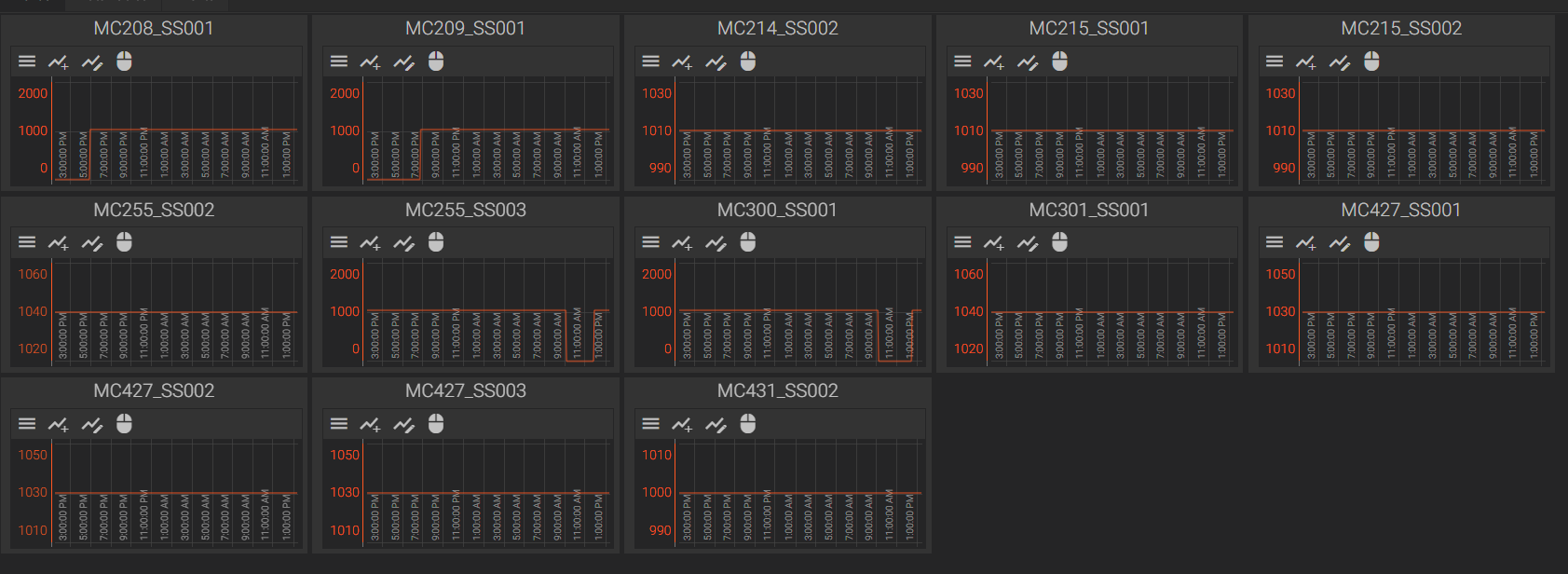
I used Asset Templates and Trends, but the small gaps (10) between tanks and the no flow position (0) makes it hard to see changes between tanks if it was a no flow at all.
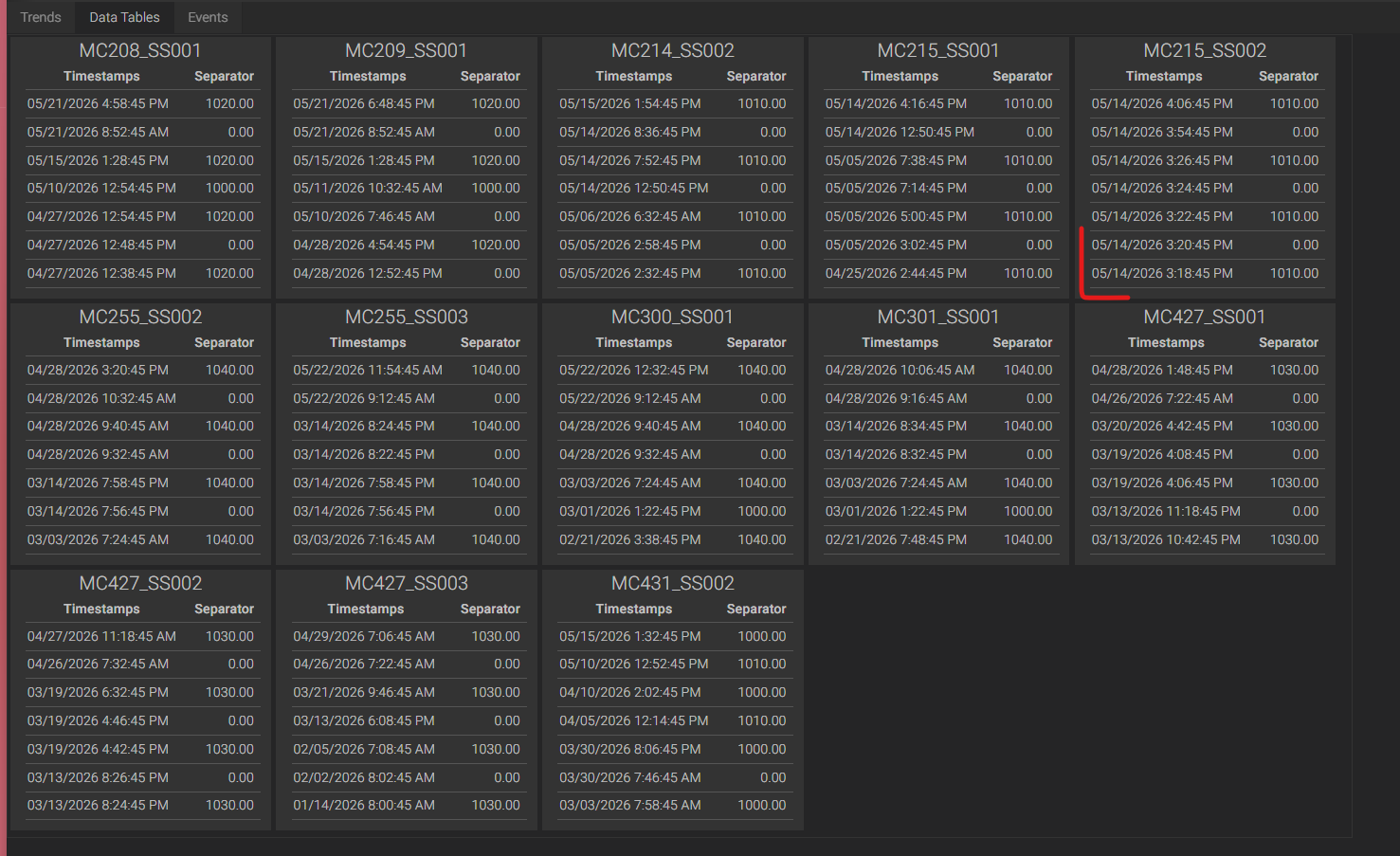
I tried Asset Templates and data tables. But you have to pick how many rows to show. You can't filter by time range. If you pick a row limit too high, you have numbers that aren't relevant. If you pick too low, you lose necessary data.
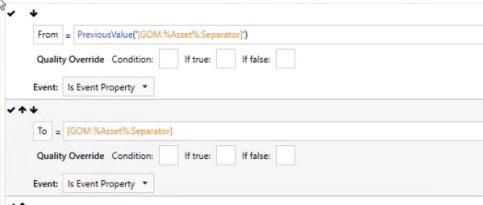
So that brings me to Calcs and Events. I thought if I could create an event that triggers whenever the value changes, I could grab the value and previous value. Here you can see I'm grabbing the PreviousValue (From position) and the current value (To position) and saving them as Event Properties.
But then how to you open an Event and immediately close it? I tried setting the Start and End Trigger to TRUE.

But the effect is that every time the value changes, it will either open or close an Event. So if it changes, it opens an Event. But it won't close the Event until the next change. Which means I miss the From and To on the Event Start instances, and Events don't close and grab values until the following change - which could be days and days away.
So the original question still stands: can I create an Event that starts and then immediately ends?
And the real question: how can I use Canary to report on the above requirements; mainly showing how a value changed every time it changed?
And if the answer is you can't do it in Canary, that's also acceptable.
3 replies
-
Hi ,
I thought I had a solution for you using a script to update the RowCount of the Data Table based upon a ValueBox's value, but since it's in an AssetTemplate, all of the RowCounts would have to be the same.
Unfortunately, events have to have a duration. The only other thing I thought of was using State Drawing instead, but that may not be available for the version this customer is on.
Sorry
-
UPDATEAfter talking with , he gave me a code snippet I needed to make my script work the way I was hoping. Not sure if this is a good solution for you or not, but I'll post it here anyway.
Using a ValueBox linked to the Position tag, I use the Count aggregate (which returns the number of raw values within an interval) and set my interval to 1d starting from yesterday. I then use the OnEndValueChange function to update the number of rows within the DataTable based upon the ValueBox. Here is what it looks like: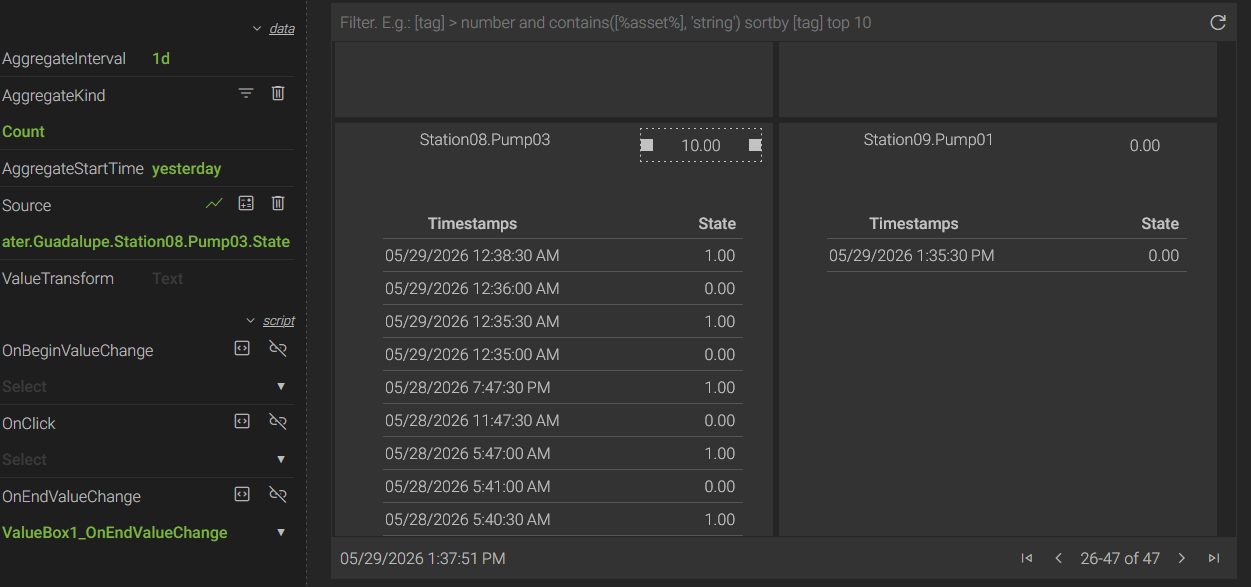
One caveat, if the ValueBox returns 0, it still displays the first row because the DataTable has to display at least one row. I guess you could make the script more robust and turn the DataTable invisible if it was 0.
Here is the script I'm using:
public void ValueBox1_OnEndValueChange(object sender, TagSubscriptionArgs subscription, TVQ tvq) { double number; if (!double.TryParse(tvq?.Value?.ToString() ?? "NaN", out number)) return; ControlBase sourceControl = sender as ControlBase; if (sourceControl == null) return; string index = new string(sourceControl.Name.ToCharArray() .SkipWhile(c => !char.IsDigit(c)) .ToArray()); if (Screen.ScreenControls["DataTable" + index] is ControlDataTable dataTable) { ControlBase.SetProperty(dataTable, "RowCount", (int)number, AxiomCore2.UpdateBehavior.NonPropagating); } } -
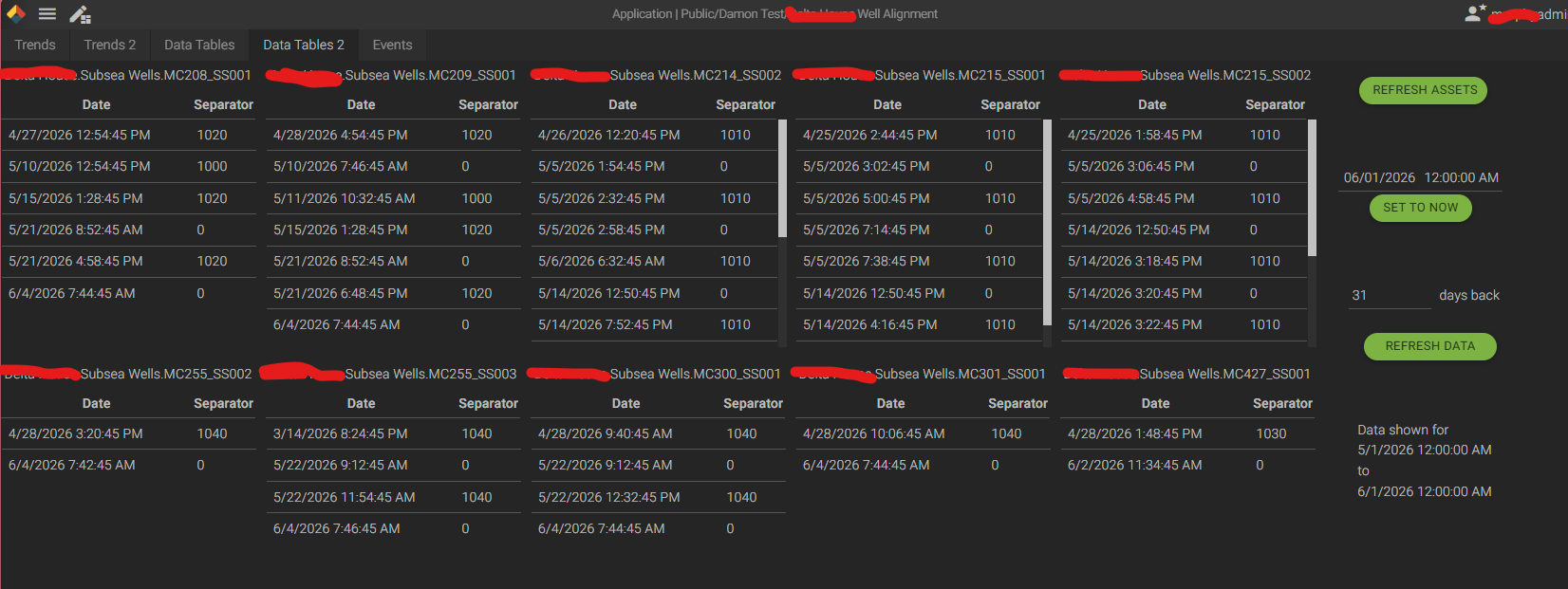
sorry for going radio silent on you. You gave me inspiration and I ended up going DEEP into the scripting. I went with Grids populated with Value Boxes.
It will find all the assets that match the type I hard coded and create 1 grid for each asset. Then it will grab the relevant tag for that asset, get all the data in the configured window, and add 1 row per data point retrieved. I love StartBound because it gives me what it was right before the window I care about, meaning I can tell them what it was before the first change, which is important.
I've never done this much scripting in Axiom before. I was super impressed with what all you can do with it. I will say, the UI was pretty frustrating. No debugging, vague errors, no intellisense. But, overall, super cool stuff.
using AxiomCore2.Client;
using AxiomCore2.ControlProperties;
using AxiomCore2.Controls;
using AxiomCore2.Data;
using AxiomCore2.Events;
using AxiomCore2.Legacy;
using AxiomCore2.Log;
using AxiomCore2.Managers;
using System;
using System.Collections.Generic;
using System.IO;
using System.Linq;
using System.Collections;
using System.Drawing;
//using CanaryWebServiceHelper;
//using CanaryWebServiceHelper.HistorianWebService;

namespace AxiomScript
{
    public partial class ScreenScript : IDisposable
    {
        // NOTE: click help icon in dialog header for API documentation and examples.
        // NOTE: use EventTimer class when timer is necessary. See API documentation.

        // axiom references
        public ControlApplication Application { get; } = ControlApplication.Instance;
        public ControlFactoryManager ControlFactory { get; } = ControlFactoryManager.Instance;
        public IDataProvider DataProvider { get; } = DataProviderManager.CreateInstance();
        public ILog Log { get; } = ClientLog.UserScript;
        public NavigationManager Navigation { get; } = NavigationManager.Instance;
        public ControlScreen Screen => _screen;

        public void OnScreenVisible()
        {
            RefreshData();
        }

        public void OnScreenInvisible()
        {
        }

        public void Dispose()
        {
        }

        public string GetSourceTag(PropertyAssetInstance instance)
        {
            return $"{instance.AssetView}.{instance.AssetPath}.Separator";
        }

        public string GetControlSafeName(string name)
        {
            return name.Replace(" ","").Replace(".","");
        }

        public IEnumerable<PropertyAssetInstance> GetAssetInstances()
        {
            AssetBrowseResult assetBrowseResult = DataProvider.BrowseAssetInstances("localhost","GOM",null,"Well","[Separator]");
            IEnumerable<PropertyAssetInstance> instances = assetBrowseResult.AssetInstances;
            return instances;
        }

        public DateTime GetStartDateTime()
        {
            ControlDateTimePicker dateTime = _screen.ScreenControls["DateTimePicker"] as ControlDateTimePicker;

            ControlTextBox textBox = _screen.ScreenControls["TB_LookbackDays"] as ControlTextBox;
            double lookbackDays;
            if (!double.TryParse(textBox.Text, out lookbackDays))
            {
                Log.Error("Lookback days is not a number. Defaulting to 7.");
                lookbackDays = 7;
            }

            return dateTime.DateTime.ToLocalTime().AddDays(-lookbackDays);
        }

        public DateTime GetEndDateTime()
        {
            ControlDateTimePicker dateTime = _screen.ScreenControls["DateTimePicker"] as ControlDateTimePicker;

            return dateTime.DateTime.ToLocalTime();
        }

        public void SetDateRangeSummary()
        {
            ControlParagraph pDateRange = _screen.ScreenControls["P_DateRange"] as ControlParagraph;
            pDateRange.Text = $"Data shown for\n{GetStartDateTime()}\nto\n{GetEndDateTime()}";
        }

        public void RefreshAssets(object sender, EventArgs eventArgs)
        {
            int x = 0;
            int y = 0;
            int column = 1;
            int width = 300;
            int gridHeight = 300;

            IEnumerable<PropertyAssetInstance> instances = GetAssetInstances();

            // Remove grids and associated labels
            List<string> controlsToKeep = new List<string>(){"DateTimePicker", "TB_LookbackDays", "L_Days", "B_RefreshAssets", "B_RefreshData", "P_DateRange", "B_SetEndToNow"};
            for (int i = _screen.Children.Count - 1; i >= 0; i--)
            {
                ControlBase control = _screen.Children[i] as ControlBase;
                if (!controlsToKeep.Contains(control.Name))
                {
                    _screen.Children.Remove(control);
                }
            }

            // Step through each asset
            foreach (PropertyAssetInstance instance in instances)
            {
                string controlNameRoot = GetControlSafeName(instance.AssetPath);

                // Build Label
                ControlLabel label = ControlFactory.CreateControl(ControlKind.Label, $"L_{controlNameRoot}") as ControlLabel;
                label.X = x;
                label.Y = y;
                label.Width = width;
                label.Text = instance.AssetPath;
                _screen.Children.Add(label);

                // Build Grid
                ControlGrid grid = ControlFactory.CreateControl(ControlKind.Grid, $"G_{controlNameRoot}") as ControlGrid;
                grid.X = x;
                grid.Y = y+35;
                grid.Width = width;
                grid.Height = gridHeight;
                grid.ColumnCount = 2;
                grid.ColumnHeaders = new string[] {"Date", "Separator"};
                grid.ColumnWidths = new object[] {75, "Auto"};
                _screen.Children.Add(grid);

                PopulateGrid(grid, instance);

                if (column == 5) // Next grid will be on next row
                {
                    x = 0;
                    y = y + 350;
                    column = 1;
                }
                else
                {
                    x = x + width + 10;
                    column++;
                }
            }


            SetDateRangeSummary();
        }

        public void SetEndToNow(object sender, EventArgs eventArgs)
        {
            ControlDateTimePicker dtPicker = _screen.ScreenControls["DateTimePicker"] as ControlDateTimePicker;
            dtPicker.DateTime = DateTime.Now;
        }

        public void RefreshDataButton(object sender, EventArgs eventArgs)
        {
            RefreshData();
        }

        public void RefreshData()
        {
            IEnumerable<PropertyAssetInstance> instances = GetAssetInstances();

            for (int i = 0; i < _screen.Children.Count; i++)
            {
                ControlBase control = _screen.Children[i] as ControlBase;
                if (control.Kind == ControlKind.Grid)
                {
                    PropertyAssetInstance match = instances.FirstOrDefault(a => $"G_{GetControlSafeName(a.AssetPath)}" == control.Name);
                    if (match == null)
                    {
                        Log.Error($"{control.Name} no longer exists. Please hit the Refresh Assets button.");
                    }
                    else
                    {
                        ControlGrid grid = control as ControlGrid;
                        grid.Children.Clear();
                        PopulateGrid(grid, match);
                    }
                }
            }

            SetDateRangeSummary();
        }

        public void PopulateGrid(ControlGrid grid, PropertyAssetInstance instance)
        {
            string controlNameRoot = GetControlSafeName(instance.AssetPath);
            string sourceTag = GetSourceTag(instance);

            TagDataResult tagDataResult = DataProvider.GetRawData(sourceTag, GetStartDateTime(), GetEndDateTime(), 100, true);

            if (tagDataResult.HasValues)
            {
                TVQ[] values = tagDataResult.Values;
                int r = 1;
                foreach (TVQ tvq in values)
                {
                    if (tvq.IsNoData || tvq.Quality == 1216) continue; // NoBounds or Extended

                    ControlGridRow gridRow = ControlFactory.CreateControl(ControlKind.GridRow, $"GR_{controlNameRoot}_{r}") as ControlGridRow;
                    grid.Children.Add(gridRow);

                    ControlLabel gridRowTimestamp = ControlFactory.CreateControl(ControlKind.Label, $"L_{controlNameRoot}_{r}_T") as ControlLabel;
                    gridRowTimestamp.Text = tvq.Timestamp.ToString();

                    ControlLabel gridRowValue = ControlFactory.CreateControl(ControlKind.Label, $"L_{controlNameRoot}_{r}_V") as ControlLabel;
                    gridRowValue.Text = tvq.Value.ToString();

                    gridRow.Children.Insert(gridRowTimestamp,0);
                    gridRow.Children.Insert(gridRowValue,1);
                    r++;
                }
            }
            else
            {
                Log.Info($"No date for {instance.AssetPath}");
            }
        }
    }
}
 Print this page