
Canary Admin, Messages config option for "ignore" filter
In Canary Admin, Messages, there are potentially messages we want to ignore as "known" items that don't mean anything. I probably wouldn't turn message logging off for them and I know the Canary team is always working on what messages get logged at what level and so forth but my idea is something like this: Maybe we are troubleshooting a problem and so we are looking at messages to help us. Messages that can safely be ignored could at the very least "cloud" our ability to troubleshoot by having to sift through them. Today, we keep up with an excel file of various message examples we have seen and what they mean and which can be ignored but that is a manual process. If we could go in an have some saved filter that categorizes some messages as "ignore" that we could apply or not, that might help.
It could also help us when doing a quick health check where we might see this tile:
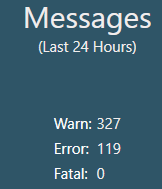
and be able to know whether or not this was really an issue. I suspect this example is but let's say 100 of these errors were all the same thing and we knew we could ignore them. The title would be a lot more useful to us I think in that case as an indication of whether or not there were problems in the last 24 hours.
AND if we still had these diagnostic tags (https://helpcenter.canarylabs.com/t/83y1wdk/email-alert-if-canary-admin-messages-count-in-last-x-hours-set-limit) which I think were removed in more recent versions but would be helpful to have back, being able to have both the count with or without the ones we setup to ignore could be helpful.
 Print this page