
Export Linked Tag Feature with Unlinked Tag Traceability – Canary Admin Tool
Hi Team,
I would like to propose an enhancement to the Linked Tag functionality in the Canary Admin Tool, focused on improving visibility, traceability, and auditability during tag linking operations.
Background
The Linked Tag feature allows bulk linking of tags via CSV upload. While this functionality is powerful, the current workflow provides limited feedback, making it difficult to identify and resolve issues—particularly when only a subset of tags are successfully linked.
Current Pain Points
1. No Traceability for Unlinked Tags
When uploading a CSV (e.g. 100 tags):
- Only a subset may be successfully linked
- There is no list of tags that failed to link
- No error reason or validation feedback is provided
- Users are left guessing which tags were skipped and why
This makes root‑cause analysis extremely time‑consuming, especially in large‑scale deployments.
2. Lack of Audit and Validation Capability
- There is no way to export or review the final “processed” result of a link operation
- Verification currently requires:
- Server access, or
- Manual file copying and comparison
- With tightening security controls, direct server access is becoming more restricted and undesirable
Proposed Enhancements
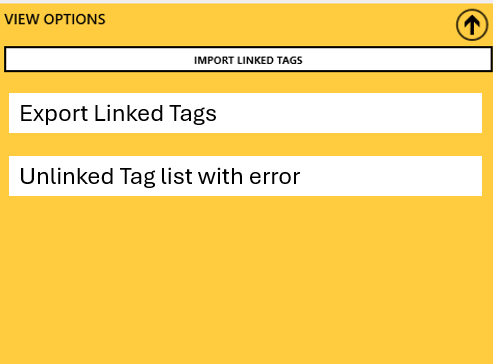
A. Export Linked Tag File (Post‑Processing)
Add a new option or tab in the Admin Tool to:
- Export the latest processed Linked Tag CSV
- Show the actual outcome of the import (not just the uploaded file)
B. Explicit Traceability for Unlinked Tags
Include detailed traceability for any tag that was not linked, such as:
- Unlinked Tag List (exportable CSV or on‑screen view)
- For each unlinked tag:
- Tag name / ID
- Requested link target
- Link status (e.g. Failed / Skipped)
- Failure reason, for example:
- Tag does not exist
- Duplicate tag
- Invalid format
- Permission or security restriction
- Target tag already linked
- Data type mismatch
This would allow users to quickly identify and resolve issues without trial‑and‑error.
C. Import Summary & Audit Metadata (Optional but Valuable)
- Import timestamp
- Username / service account that performed the link
- Total tags processed
- Successfully linked count
- Failed / unlinked count
Benefits
- Full traceability and auditability of linked tag operations
- Faster troubleshooting and reduced commissioning time
- Eliminates guesswork when linking hundreds of tags
- Reduced dependency on server access
- Improved security and data governance
- Better user confidence in bulk operations
This enhancement would significantly improve the robustness and usability of the Linked Tag workflow in the Canary Admin Tool, particularly for large or regulated environments.
Kind regards,
Haneesh
2 replies
-
, is this for a cloud instance of on-prem. If you own the Historian server you can manage linked tags in the database file: https://helpcenter.canarylabs.com/t/g9ykhs4/how-to-undo-linked-tags. But, we've got a bunch of customers on cloud and we don't have access to the database file. :( So I'm 100% on board with this!
 Print this page