
10
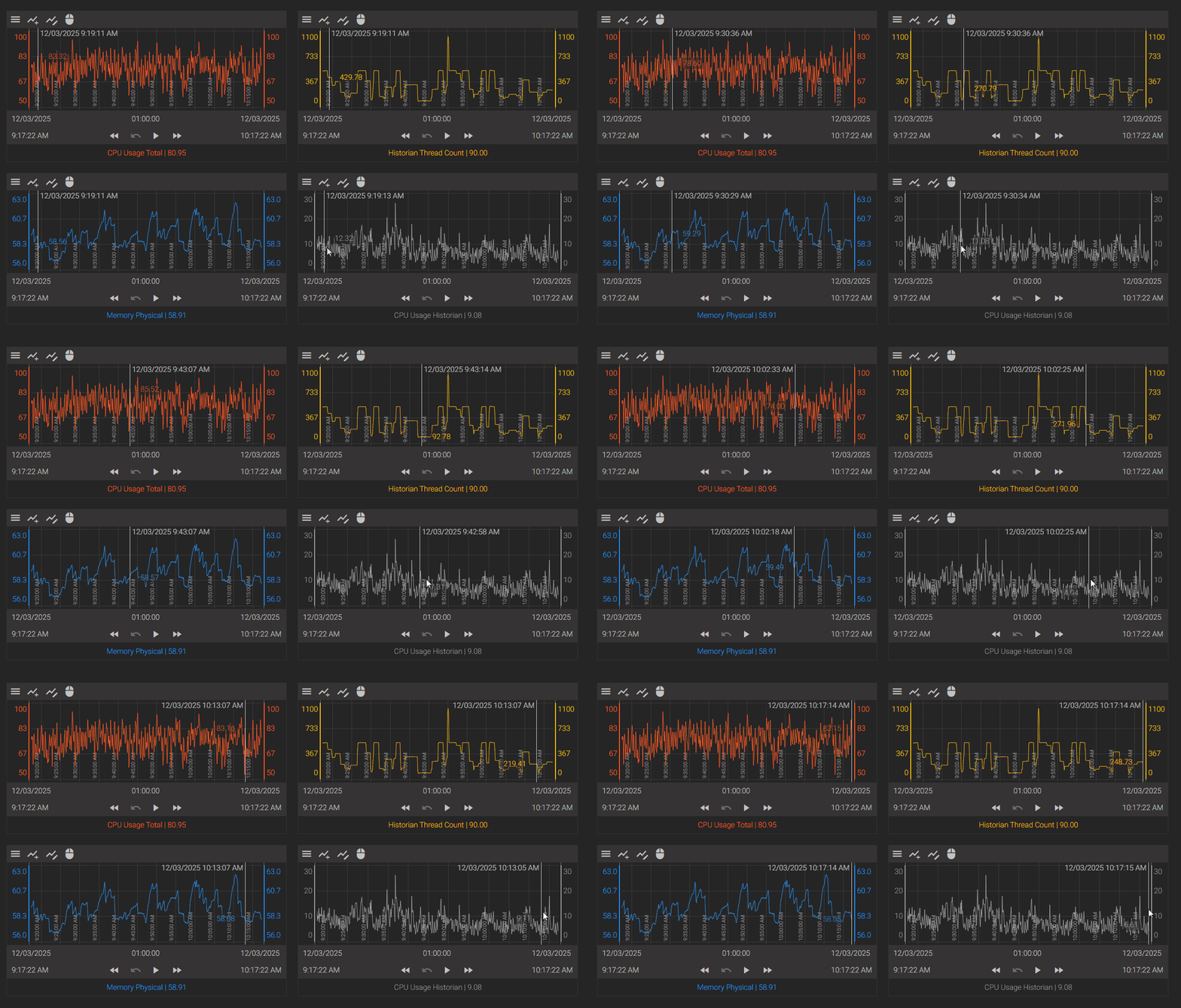
Sync Cursors across multiple trend charts
Feedback / Product Ideas and Feature Requests / Axiom
Add the ability to sync the cursor across multiple trend charts either by timestamp or by position (% of width). Add a menu item in the cursor menu to configure this setting for each trend chart.
Proof of Concept:
- Create an HTML file with the attached code and name it cursorsync.html
- Create a folder named "custom" in the WebFiles folder for Axiom. In Version 23 and below, this is located in C:\Program Files\Canary\Axiom\WebFiles, in Version 24 and above, this located in C:\Program Files\Canary\Axiom\wwwroot
- Copy the HTML file to the folder created in the previous step
- Open an Axiom application and create an IFrame
- Set the UrlSource to "custom/cursorsync.html"
Source of cursorsync.html
<!DOCTYPE html>
<body>
<script>
window.$ = window.parent.$
window.App = window.parent.App
$('.component-cursor').on('mousemove touchmove', function(e, data) {
    // Get a list of all the .component-cursor elements except the one receiving the event
    const plots = $('.component-cursor').not(this);
    // Create the jquery object for this element
    const $this = $(this);
    // Prevent cascade of recursive events being triggered
    // Only run if this is the original event
    if (data !== undefined && data.customEvent) {
        return;
    }
    // Determine the coordinates based on the event type
    let clientX, clientY;
    let isTouch = false;
    if (e.type === 'touchmove') {
        // Touch events wrap the relevant data in originalEvent.touches
        const touch = e.originalEvent.touches[0] || e.originalEvent.changedTouches[0];
        if (!touch) return; // Exit if no touch data is found
        clientX = touch.clientX;
        clientY = touch.clientY;
        isTouch = true;
    } else {
        // Mouse events
        clientX = e.clientX;
        clientY = e.clientY;
    }
    const thisOffset = $this.offset();
    const relativeX = clientX - thisOffset.left;
    const relativeY = clientY - thisOffset.top;

    // The rest of your synchronization logic remains the same
    const zoomFactor = App.Controls2.Application.zoom.getZoomFactor().ratio;
    const width = $this.width() * zoomFactor;
    const height = $this.height() * zoomFactor;
    const relativeWidth = relativeX / width;
    const relativeHeight = relativeY / height;
    for (var i = 0; i < plots.length; i++) {
        const plot = $(plots[i]);
        const plotOffset = plot.offset();
        const plotWidth = plot.width() * zoomFactor;
        const plotHeight = plot.height() * zoomFactor;
        const plotX = relativeWidth * plotWidth;
        const plotY = relativeHeight * plotHeight;
        // Pass isTouch flag in the triggered event data
        plot.trigger({
            type: 'mousemove', // Trigger 'mousemove' on other elements for consistency
            clientX: plotOffset.left + plotX,
            clientY: plotOffset.top + plotY,
            isTouch: isTouch,
            isMouseDown: false
        }, [{
            customEvent: true  // Pass this data object so that only the original event is broadcast
        }]);
    }
});
</script>
</body> Print this page