
"All ReadOnly" Folder is missing
I'm getting errors on the "All ReadOnly" folder not being present. Looking in to it, it doesn't look like it exists. But when I login to Axiom I see the "Read Only" Folder there as a path (granted I can't save to it).
I've gone through the Identity Tile help in the knowledge base and I'm still failing to understand how to properly add and use this folder or remove just it from the Axiom Save-As path list to avoid further confusion. Because I'm currently getting dozens of logged errors of users trying to save to it.
Can someone point me in the proper direction?
Regards,
Canary v25.3 on Windows Server 2025
6 replies
-
Hi ,
It sounds like you're encountering a bug which will be fixed in v25.5. Is this one of the errors being logged?
MESSAGE: Error processing gRPC request "/canary.axiom.grpc.session.CanaryAxiomSessionToService/FileBrowse"
   EXCEPTION: System.IO.DirectoryNotFoundException: Could not find a part of the path 'C:\ProgramData\Canary\Axiom\Files\All ReadOnly'.
      at System.IO.Enumeration.FileSystemEnumerator`1.Init()
      at System.IO.Enumeration.FileSystemEnumerableFactory.UserFiles(String directory, String expression, EnumerationOptions options)
      at System.IO.Directory.InternalEnumeratePaths(String path, String searchPattern, SearchTarget searchTarget, EnumerationOptions options)
      at System.IO.Directory.GetFiles(String path, String searchPattern, EnumerationOptions enumerationOptions)
      at Canary.Axiom.Service.GrpcSessionToService.GrpcSessionToServiceService.FileBrowse(FileBrowseRequest request, ServerCallContext context)
      at Grpc.Shared.Server.UnaryServerMethodInvoker`3.ResolvedInterceptorInvoker(TRequest resolvedRequest, ServerCallContext resolvedContext)
      at Grpc.Shared.Server.UnaryServerMethodInvoker`3.ResolvedInterceptorInvoker(TRequest resolvedRequest, ServerCallContext resolvedContext)
      at Canary.Utility.GrpcHelper.InterceptorPerformanceLog.UnaryServerHandler[TRequest,TResponse](TRequest request, ServerCallContext context, UnaryServerMethod`2 continuation)
      at Grpc.Shared.Server.InterceptorPipelineBuilder`2.<>c__DisplayClass5_0.<<UnaryPipeline>b__1>d.MoveNext()
   --- End of stack trace from previous location ---
      at Grpc.Shared.Server.InterceptorPipelineBuilder`2.<>c__DisplayClass5_0.<<UnaryPipeline>b__1>d.MoveNext()
   --- End of stack trace from previous location ---
      at Canary.Utility.GrpcHelper.ServerInterceptorLogAndWrapExceptions.UnaryServerHandler[TRequest,TResponse](TRequest request, ServerCallContext context, UnaryServerMethod`2 continuation)
25.5 is slated to be released next week.
You could also try giving yourself (or someone else) ReadWrite access to the ReadOnly folder within the Canary Admin (Identity tile>Security>Axiom Security) then logging in as that user.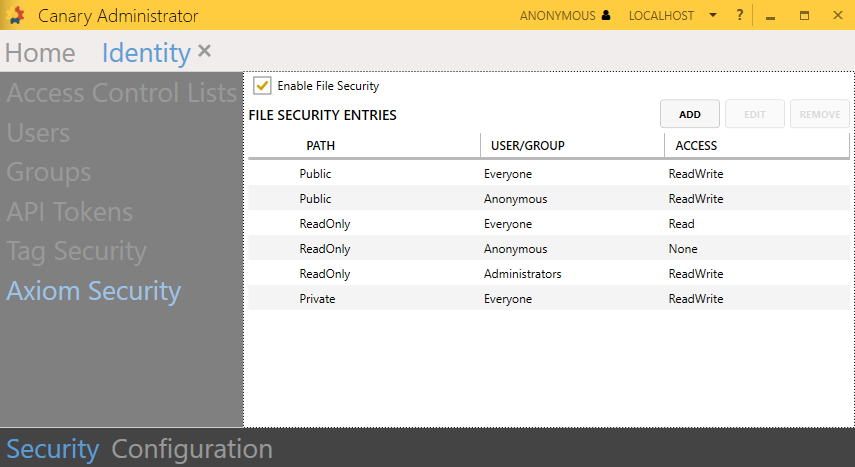
-
Yes Sir, that is the error I am experiencing. Now is there a way I grant access to a MS365 group?
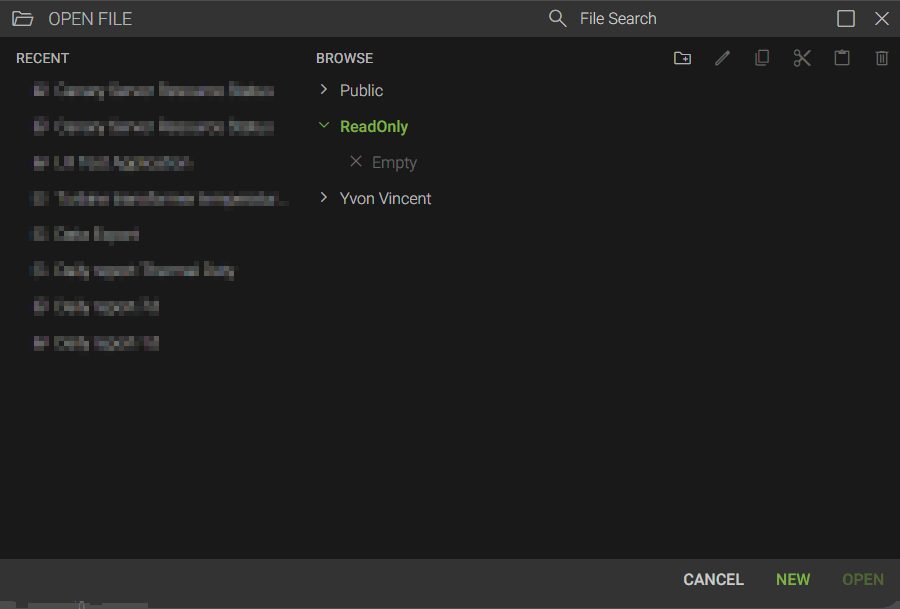
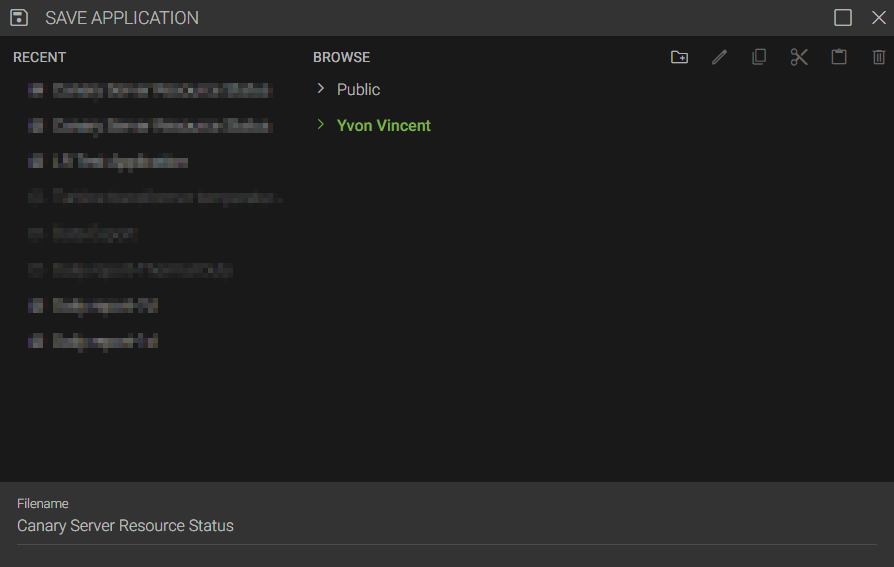
Now something that's new, I can see the Read-Only folder when I go to Open a display, but now I can no longer see the Read-Only folder when I go to Save.
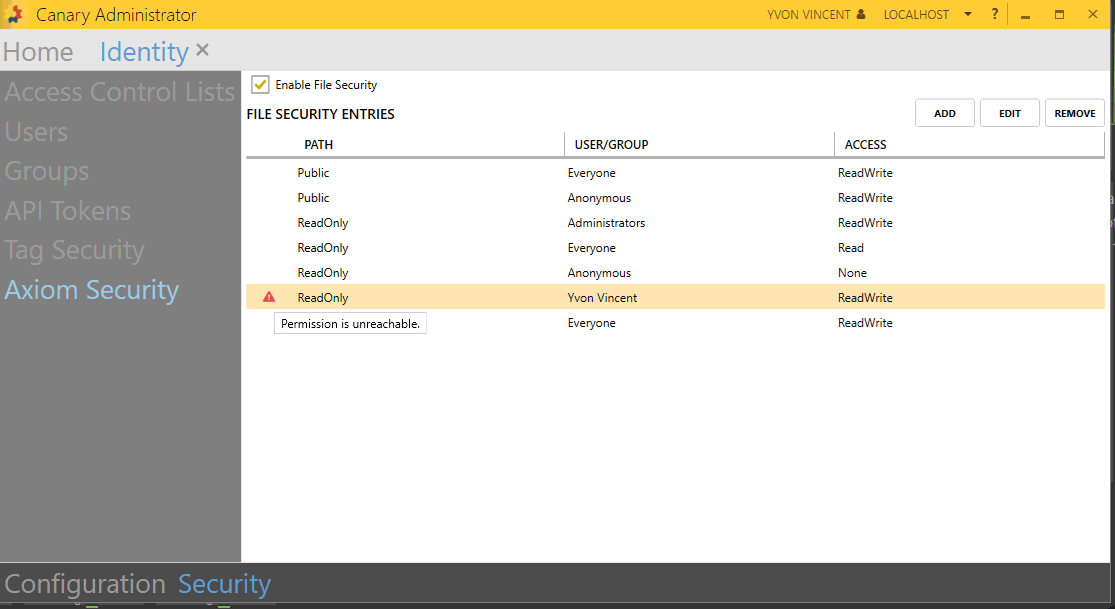
and the permission I added for myself shows that it is unreachable. Now is there a way to browse to the path instead of just typing the name? Cause the Error notes "All ReadOnly" but in the Axiom Security it's just "ReadOnly". -
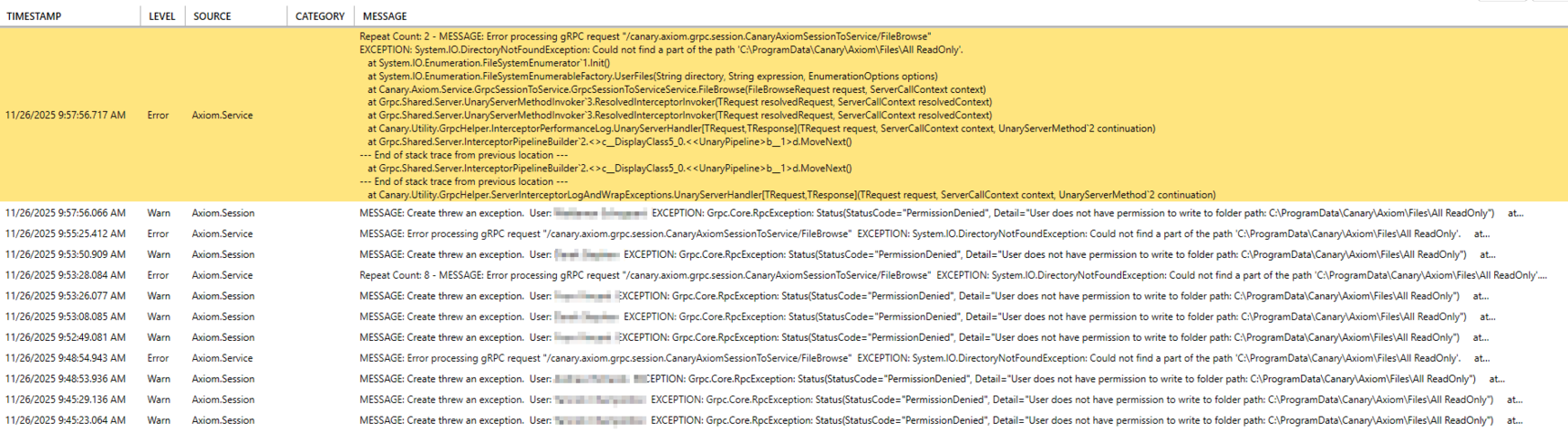
Here is a screenshot of the actual error (I didn't realize until today I could post photos here, and you can see, we're seeing a lot of user errors for not having access to this folder including myself and I'm not sure how all these are coming up.
-
Hi ,
You cannot see the ReadOnly folder when you go to Save because it's not able to see that you have Write permissions to it. The permission is unreachable because it falls after the Everyone group (which you would be a part of) which only has Read access. From that screen, you can click and drag your username above Everyone and that should resolve the permissions issue and allow you to save to the ReadOnly folder.
I believe the errors are occurring because users do not have the permission to create this folder. This is a bug which is fixed in the next release, 25.5. I suspect, once you log in and save something to this folder, other users will no longer generate the error.
 Print this page